If you’ve ever stood at a checkout counter, fumbling through a wallet for exact change or squinting at a small screen to confirm your total, you’ve interacted with a pole customer display (PCD) — even if you didn’t know its name. For years, I’ve supplied these devices to grocery chains, convenience stores, electronics retailers, and small café franchises, and one question comes up more often than any other from new clients: “What makes a pole customer display worth the investment?” Pole Customer Display
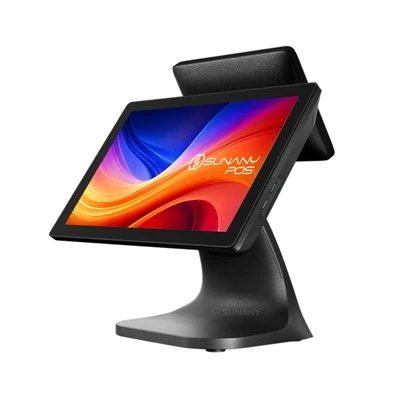
I get it. When you’re outfitting a new store or upgrading aging checkout tech, it’s easy to write these displays off as an afterthought. They sit on a pole behind the cashier, facing the customer, so how different can they be, right? Wrong. A good PCD isn’t just a screen; it’s a tool that cuts down on checkout disputes, builds trust with shoppers, and even speeds up transaction times when it works as it should. Over the last decade, I’ve shipped thousands of these units, and I’ve seen first-hand what makes a reliable PCD versus one that ends up in a back closet gathering dust. Let’s break down the non-negotiable features I never skip when building or sourcing for my clients.
First and most obvious: display visibility that works in every checkout environment. I’ve had a client reach out last year complaining their new PCD was useless — the screen was impossible to read in the bright overhead lights of their big-box grocery store, so customers were asking cashiers to repeat totals three or four times. That’s the kind of avoidable frustration I aim to prevent. Visibility isn’t just about brightness, though that’s a key spec. We test every PCD we supply to hit a minimum of 500 nits of brightness, which is the standard for clear visibility under harsh fluorescent or LED overhead lighting. But we also add anti-glare coating to the screen, because even a bright screen becomes unreadable if it’s reflecting a overhead light or a store’s window display.
Size and angle adjustability matter too. I’ve supplied units to tiny convenience stores where the checkout counter is only 12 inches deep, so a 10-inch display sticking up at a 90-degree angle blocks the cashier’s view of the scan gun. For those spaces, we offer compact 5.7-inch screens that adjust 180 degrees: you can tilt them flat toward the customer for easy reading and swivel them back 90 degrees when the cashier needs to scan items quickly. For larger retailers with wider checkout lanes, a 7.5-inch screen is ideal — big enough for customers to see totals, coupons, and item details without craning their necks. The last thing a store needs is a customer leaning over the counter mid-transaction to read a tiny, fixed screen, which slows down lines and leads to extra questions for cashiers.
Next, the all-important connection reliability. This is where a lot of cheap PCDs fall apart — literally, in some cases. A PCD needs to stay synced to the point-of-sale (POS) system 100% of the time, because if it drops a signal mid-transaction, the cashier has to pause, troubleshoot, and re-run the order, which kills checkout flow. I’ve seen clients go the cheap route: they grab a PCD that connects via old RS232 cable, only to have wires fray in high-traffic stores where carts and backpacks brush against them all day. The solution? We prioritize either USB-powered connection (which is simpler to set up than RS232) or Ethernet for high-volume locations, plus we include reinforced cable strain relief to prevent wires from pulling loose if they get knocked. We also test every unit’s signal sync time: a good PCD should update with the cashier’s input in less than half a second, no lag. If the customer is still seeing the old subtotal while the cashier has already applied a discount, that’s a trust issue waiting to happen — the shopper might think they’re being overcharged, even if it’s just a delay in the display.
Durability is another make-or-break feature, especially for high-traffic stores. Checkout counters are messy places: spilled soda, crumbs, spilled coffee, even the occasional dropped phone. A PCD needs to hold up to that. We build all our units with IP rating protection — at least IP54, which means they’re dust-resistant and can handle accidental splashes from a drink next to the counter. The screen is scratch-resistant tempered glass, not plastic, because plastic screens scuff easily when a customer’s keys or a loyalty card brushes against it. I had a small café client tell me last year that their previous PCD had to be replaced three times in 18 months because the plastic screen got so scratched up, customers complained they couldn’t read the total. That’s a huge waste of money and time, and it’s entirely avoidable with a durable unit. We also build the pole that holds the display from heavy-gauge plastic or aluminum, not thin flimsy metal that bends when a cart bumps into it. A bent pole means the display is tilted wrong, so customers can’t read it — another preventable headache.
Usability for cashiers, too — that’s a feature many suppliers overlook. A PCD that’s hard to set up or adjust can throw off an entire shift. I design our units to be plug-and-play for the most part: no complicated driver downloads or technical setup, just plug it into the POS and it works. For adjustable poles, we use a secure locking mechanism that lets cashiers tilt or swivel the display in seconds, no tools required. That’s important because cashiers often don’t have time to fiddle with a screwdriver mid-shift; if a new trainee adjusts the display wrong, they need to fix it fast to keep lines moving. We also make sure the display shows clear, high-contrast text, not tiny pixelated fonts. Customers don’t want to squint at text that’s so small they need glasses to read it, and cashier training doesn’t need to involve teaching staff how to make blurry text legible.
Wait, and what about the display content? A good PCD isn’t just for showing totals — it should be flexible enough to display promotional content too. For retailers who want to add extra value, a PCD that can cycle through ads for a current sale, a loyalty program reminder, or even a store map is a huge bonus. But here’s the thing: it should only do that when the transaction is complete. I’ve heard horror stories from clients where a PCD blares ads mid-transaction, distracting customers or making it hard to read the order. Our units switch seamlessly between transaction mode and promotional mode automatically, so customers see their order details while checking out, then see relevant ads once the transaction is done. That’s a small feature that adds a lot of value for stores that want to boost repeat business.
Compatibility with existing POS systems is non-negotiable too. I’ve had a few clients come to me with PCDs that worked great, but only with the old POS system they used five years ago. When they upgraded their POS to a newer model, the PCD became useless, so they had to buy all new units. That’s a waste that my customers don’t have to deal with, because we design our PCDs to work with all major POS systems: Square, Clover, Shopify POS, Lightspeed, and many more. We also provide free technical support to make sure the setup goes smoothly, no matter what POS system a store is using. I’ve had a small boutique reach out late at night once, panicking because their new POS and PCD weren’t syncing, and our team walked them through the fix in 10 minutes — that’s the kind of support that makes a good supplier, not just a good product.
Cost is a factor, obviously, but here’s the truth: a cheap PCD that needs to be replaced every six months is more expensive in the long run than a slightly more expensive durable unit that lasts three years. I’ve seen clients try to save $50 per unit, only to end up spending $200 more in replacement costs and lost productivity from checkout delays. When I work with a new client, I don’t push the most expensive unit — I assess their store: how much foot traffic they get, what their current checkout setup is, how much space they have — and recommend the unit that fits their needs, not a one-size-fits-all solution. That’s the kind of supplier I am: I build products that solve real problems, not just check boxes on a spec sheet.
I want to be clear: I’m not here to sell you a perfect product that never has issues. Technology breaks, that’s a fact. But a good PCD should be reliable enough that those issues are rare, and when they do happen, they’re easy to fix. That’s why we offer a one-year warranty on all our units, plus 24/7 technical support. If a unit breaks, we ship a replacement within two business days, no extra charge. For a busy store, that downtime is lost revenue, so getting a replacement fast is just as important as the display itself.
At the end of the day, a pole customer display is more than a piece of checkout hardware. It’s a point of trust between a store and its customer. When a customer can clearly see their total, apply a coupon, and confirm that they’re being charged correctly, they’re more likely to leave the store feeling satisfied, and more likely to come back. I’ve seen it firsthand: a convenience store I supply reduced checkout disputes by 30% after switching to our PCDs, and a café boosted loyalty program sign-ups by 15% after adding promotional content to their displays. Those results aren’t from flashy features — they’re from the basics done right: a visible screen, a reliable connection, durable build, and a product that works with the customer’s existing setup.
If you’re looking to upgrade your checkout setup, or you’re outfitting a new store and want a PCD that won’t let you down, I’d be happy to walk you through our options and answer any questions you have. Whether you run a small coffee shop, a large grocery chain, or anything in between, I’ll help you find a unit that fits your space, your traffic, and your budget. Reach out to our team to start a conversation about your needs, and we’ll help you find the right pole customer display for your business.
Terminal Self Checkout References
- Retail Technology Trends Report, National Retail Federation, 2023
- Point of Sale Hardware Durability and Usability Study, POS Industry Association, 2022
- Customer Experience in Checkout: 2023 Shopper Survey, Retail Customer Experience Magazine
Shenzhen Sunany Technology Limited
Shenzhen Sunany Technology Limited is one of the most professional pole customer display manufacturers and suppliers in China, featured by quality products and good price. Welcome to wholesale bulk advanced pole customer display made in China here and get pricelist from our factory. Contact us for customized service and OEM service.
Address: 7F, Building 2, Pingji Avenue No.13, Longgang, Shenzhen, China.
E-mail: info@sunany.com
WebSite: https://www.sunanypos.com/
